thumbnail

Battery Information AIA for Thunkable


Download

Project Detail:

File Name:  Battery Information AIA for Thunkable
Platform:  Thunkable
Type: AIA File
Category:  AppsTools
Size:  16.9 KB (AIA File)
Battery Information AIA for Thunkable | Free Download

How can you use it?

Step 1: Go to app.thunkable.com and sign in to your account.

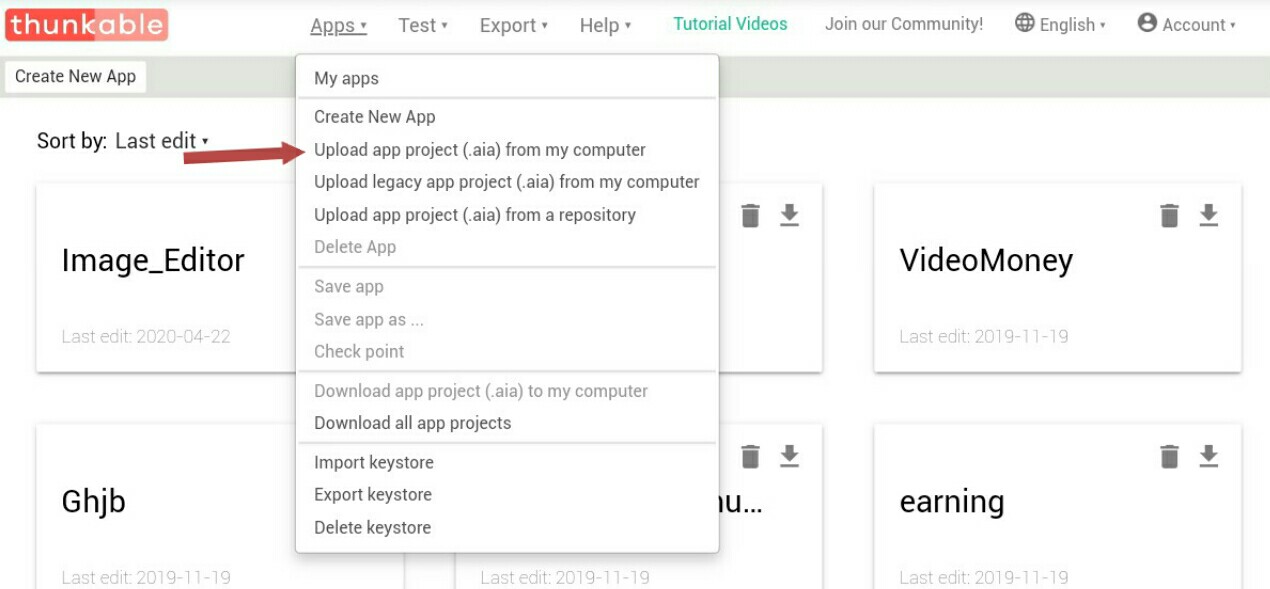
Step 2: Click on the “Apps” tab on the top left of your screen.
How to Import AIA File for Thunkable

Step 3: Click “Upload app project (.aia) from my computer.
How to Import AIA File for Thunkable

Step 4: Select the project that you previously downloaded.

thumbnail

WiFi Test AIA File for MIT App Inventor


Download
WiFi Test AIA File for MIT App Inventor | Free Download

Project Detail:

File Name:  WiFi Test AIA File for MIT App Inventor
Platform:  AndroidMIT App Inventor
Type: AIA File
Category:  AppsTools
Size:  39.38 KB (AIA File)
 WiFi Test AIA File for MIT App Inventor | Download Now
WiFi Test AIA File for MIT App Inventor | Download Now

How can you use it?

Step 1: Go to http://ai2.appinventor.mit.edu/ and sign in to your account.

Step 2: Click on the “My Project” tab on the top left of your screen.

Step 3: Click “Import project (.aia) from my computer.

Step 4: Select the project that you previously downloaded.

thumbnail

URL Shortner App AiA File for Kodular


Download

Project Detail:

File Name:  URL Shortner App AiA File for Kodular
Platform:  Android, Kodular 
Type: AIA File
Category:  AppsTools
Size:  195.94 KB (AIA File)
Download Now - URL Shortner App AiA File for Kodular
 Download Now - URL Shortner App AiA File for Kodular

How can you use it?

Step 1: Go to https://creator.kodular.io/ and sign in to your account.

Step 2: Click on the “Project” tab on the top left of your screen.
How to Import aia file in Kodular

Step 3: Click “Import project (.aia) from my computer.
How to Upload aia file in Kodular

Step 4: Select the project that you previously downloaded.

thumbnail

WiFi Test AIA File for Kodular | Free Download Kodular AIA Source File


Download
WiFi Test AIA File for Kodular | Free Download Kodular AIA Source File

Project Detail:

File Name:  WiFi Test AIA File for Kodular 
Platform:  Android, Kodular 
Type: AIA File
Category:  Apps, Tools
Size:  39.51 KB (AIA File)
 WiFi Test AIA File for Kodular Free Download
WiFi Test AIA File for Kodular Free Download

How can you use it?

Step 1: Go to https://creator.kodular.io/ and sign in to your account.

Step 2: Click on the “Project” tab on the top left of your screen.

Step 3: Click “Import project (.aia) from my computer.

Step 4: Select the project that you previously downloaded.

thumbnail

Battery Information Apps | MIT App Inventor AIA Source File Download


Download

Project Detail:

File Name:  Battery Information Apps AIA File
Platform:  AndroidMIT App Inventor
Type: AIA File
Category:  AppsTools
Size:  16.9 KB (AIA File)
 Battery Information MIT App Inventor AIA Source File Download
  Battery Information MIT App Inventor AIA Source File Download

How can you use it?

Step 1: Go to http://ai2.appinventor.mit.edu/ and sign in to your account.

Step 2: Click on the “My Project” tab on the top left of your screen.

Step 3: Click “Import project (.aia) from my computer.

Step 4: Select the project that you previously downloaded.

thumbnail

Mobile Torch Apps AIA File for Kodular | Free Download


Download

Project Detail:

File Name:  Mobile Torch Apps AIA File for Kodular
Platform:  Android, Kodular 
Type: AIA File
Category:  Tools
Size:  123.13 KB (AIA File)
 Mobile Torchlight AIA for Kodular free Download
  Mobile Torchlight AIA for Kodular free Download

How can you use it?

Step 1: Go to https://creator.kodular.io/ and sign in to your account.

Step 2: Click on the “Project” tab on the top left of your screen.

Step 3: Click “Import project (.aia) from my computer.

Step 4: Select the project that you previously downloaded.

thumbnail

VPN Check Application AIA Project file for Kodular | Free Download


Download

Project Detail:

File Name:  VPN Check Application
Platform:  Android, Kodular 
Type: AIA File
Category:  Tools
Size:  13.05 KB (AIA File)
 VPN Check Application AIA Project file for Kodular | Free Download
 VPN Check AIA for Kodular

How can you use it?

Step 1: Go to https://creator.kodular.io/ and sign in to your account.

Step 2: Click on the “Project” tab on the top left of your screen.

Step 3: Click “Import project (.aia) from my computer.

Step 4: Select the project that you previously downloaded.

thumbnail

QrCode Generator aia file for Thunkable | free download aia file


Download

Project Detail:

File Name:  QrCode Generator aia file for Thunkable
Platform:  Thunkable
Type: AIA File
Category:  AppsTools
Size:  197 KB (AIA File)

How can you use it?

Step 1: Go to app.thunkable.com and sign in to your account.

Step 2: Click on the “Apps” tab on the top left of your screen.

Step 3: Click “Upload app project (.aia) from my computer.

Step 4: Select the project that you previously downloaded.

thumbnail

Turbo VPN Pro Apps | Free Download for Android


Download

The description of Turbo VPN

100% free VPN! High VPN speed! The best unlimited free VPN clients for android. Turbo VPN – Free VPN proxy, connect as a hare to unblock sites, WiFi hotspot secure and protect privacy.
Fastest - Connect successfully as a hare with high VPN speed.
Easiest - One tap to connect to VPN proxy server.
Most Stable - Have lots of free cloud proxy server to provide better VPN service.

Turbo VPN – Free VPN proxy,
Bypass the firewalls as school free VPN proxy for school wifi and school computer.

Protect your network traffic under WiFi hotspot Browse anonymously and securely without being tracked. Enjoy private browsing.
Works with WiFi, LTE, 3G, and all mobile data carriers.
Encrypts data using OpenVPN protocols (UDP / TCP).
Free download this light android VPN APK now.

User Terms:

By downloading and/or using this product, you acknowledge and agree to the end user license agreement and Privacy Statement at
http://d32z5ni8t5127x.cloudfront.net/turbo/1.1.Privacy_Policy_for_Innovative_Turbo_VPN_V1.0_Clean_2019.3.15.htmll

For policy reason, this service can not be used in China. We apologize for any inconvenience caused.